Local folder, external disk and network share (UNC/NAS)
Send SQL Server backups to a local folder, an external disk or a NAS and Windows share. Permissions, credentials and retention explained.
On this page
These destinations need no cloud account. Add them under Destinations (in the wizard or later in the app) with Add destination.
Local folder and external disk
Choose the type Local folder and enter a full path such as D:\Backups. An external disk is the same thing: give the path on its drive letter.
- Use a different disk than the one holding the database files. A backup on the same disk is lost together with the database.
- The path must be a full drive path. A network path (
\\server\share) is a different type, see below. - A mapped network drive (for example
Z:) belongs to your own Windows session. The service runs under its own account and cannot see it. Use the type Network share (UNC) with the real path instead. - An external disk must be connected when the backup runs. If it is not, that destination fails, the other destinations still receive the backup and you get an e-mail.
Network share (UNC) and NAS
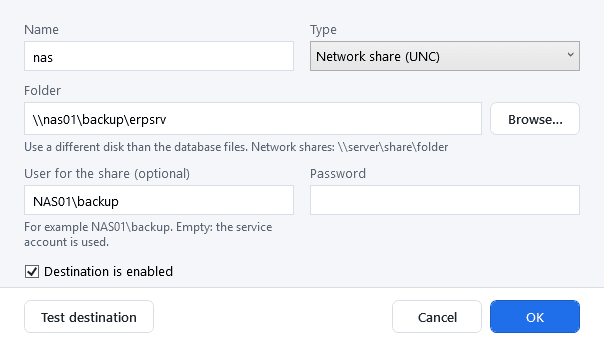
Choose Network share (UNC) and enter the share path, for example \\nas01\backups\sql. The optional user and password are for the share:
- User in the form
NAS01\backup,DOMAIN\useroruser@domain, together with the password. User and password are given together or both left empty. - If you leave them empty, the SQL Data Log service connects with its own account. It runs as
NT SERVICE\SQLDataLog, which appears on the network as the computer account (DOMAIN\COMPUTER$). That works inside a domain when the share grants that account Modify rights. A NAS outside the domain usually needs a user and password. - The password is stored encrypted with Windows DPAPI (LocalMachine), not in the settings file, and it never appears in logs or messages.
Always use Test destination. It writes a small file to the folder and deletes it again, so permission and name problems show up now and not during the first night backup.
Which account needs which permission
Two different accounts are involved, and mixing them up is the most common setup problem.
| Account | Needs |
|---|---|
| SQL Server service account | Write access to the staging folder, because SQL Server itself writes the backup there first. Setup can grant this for you in the last wizard step. |
| SQL Data Log service (NT SERVICE\SQLDataLog) | Read and delete in the staging folder, and write access to every destination. |
SQL Server never writes to your destinations directly; the SQL Data Log service copies the finished, compressed and encrypted .sdlb file there.
Retention: how long backups are kept
Retention is set per backup job (Backups, job dialog, Retention). For each database it keeps the newest full backup of each of the last N days, ISO weeks and months; a window set to 0 is off and at least one must be on. Differential and log backups are kept for the narrowest window that is set. Old files are deleted from the destinations automatically.
- A file that a differential or log backup of another job still needs is never deleted.
- Only files written by SQL Data Log are deleted. Other files in the folder are not touched.
- Days, weeks and months are counted in the server's local time zone.